Is the sound you get from the Mercury v3 appreciably better than via US?
It’s definitely clearer but different.
I would need to sit with the unit more before I’m comfortable making an assessment.
I am using this power supply:
https://pt.aliexpress.com/item/1005002753256975.html
What happens is, when i click play in Roon, every song skips, and skips and skips until i reboot the Pi.
I am traveling to the US on July the 7th for a week, so its an opportunity right there.
BTW, i connect my WANDLA into the Pi via USB.
Definitely connectivity. Are you using Ethernet or wifi? does the Pi have a static IP address or are you relying using DHCP for assignment? When this happens do you have visibility into the Pi via the OS? Volumio or Ropee?
What you’re trying to do is never going to have a solution that doesn’t require you to “switch” something. Either in your PC or on your DAC’s input switch.
I have one cheap DAC I use for gaming and YouTube and PC sounds and one DAC I use for streaming as I only listen to music via streaming when I’m on the PC. I still have to switch the input on my amp. lol
You’re paying a price for a solution either way, and the price you’ll pay for going USB 100% is dollars.
That said, I can’t imagine leaving the Amber up 100% of the time as I keep my PC on 24/7. So don’t know if the Amber suffers from long warmup periods.
3 Likes
Its Ropiee and i use ethernet and DHCP, its highly unlikely it fails to receive an IP but once it fails tomorrow i will try to access it via IP, see if i can see the admin UI. Thanks for this angle, it is one i never chased after!
I would disconnect the streaming service you use in Roon and log in again in case it’s not local files
FWIW i see this pretty commonly with Roon on several different streamers.
It seems to be roons response to almost any error is just skip to the next track.
Do you see it with local files as well as streamed ones?
I’d the pi hardwired or connected via WiFi?
I only use Qobuz, no local files and the Pi is using ethernet, not wifi.
The issue is for sure related to the Pi since rebooting the streamer, and only the streamer, solves it every time, no need to login to Qobuz again or to reboot the Roon server which is a ROCK on Intel NUC.
Today the problem did not happen so i was not able to check if the Ropieee admin responds via IP, i will try that again tomorrow.
2 Likes
Restarting the pi still restarts the Roon endpoint so it’s basically reseting the connection but from my past experience the song skipping is how Roon handles bad connections and for some reason logging out and in to Qobuz helped (with Tidal too)
2 Likes
Agree with @orrman when this manifests it’s a Roon issue rather than a streamer issue as Roon is unable to lock on the file. Might want to check if there any updates for the Rock. Otherwise confirm your settings in Roon are on the default settings.
1 Like
It can be either.
Sometimes when my Pacific gets power cycled because of an outage, the optical Rendu doesn’t initialize the USB properly, it shows as a DAC in Roon, but it won’t actually play anything.
When that happens it has exactly the same behavior.
Roon just skips a track if for any reason it can’t play it, I see the same thing with bad network connections or just Qobuz not streaming something fast enough.
I’d imagine this could be anything from the Pi going power saving mode and something not correctly initializing afterwards, to a bad cable, to qobuz issues, to a power problem.
What you can do is determine what roon thinks is happening by looking at the roon logs on the server, though their not always the easiest thing to interpret.
2 Likes
Glad your chimed in, I was going to tell @orrman and @Camus to don’t confuse the poor guy. For stuff like this you’ve got to start at the most likely and do troubleshooting 101 ruling stuff out and work through to the least likely.
I’m still leaning network but you’re 100% correct that Roon pretty much defaults to that behavior for any issue. I experienced the same thing with my DAC after a DDC power cycle.
@luizgarcia Just start with network as that’s stuff you can test and rule out pretty easily.
1 Like
I am not sure why our suggestion can be interpreted as confusing as we are all trying to help @luizgarcia.
It can be a variety of factors, like you said its best to start with most likely and given that Roon is is the primary source that was what was suggested. Obviously it can be several different things as highlighted in their support article and yes it includes network issues;
1 Like
It’s not wrong, it’s that it’s not where you want to start the troubleshooting. Given the description, it may take quite a bit of it. lol
1 Like
Thanks for the help guys, i really appreciate it!
Now that i have options to troubleshoot the damn thing is working well for the past two days so i can’t put that knowledge to good use, but i will once it happens again!
I am actually a senior software developer so i have no problem going thru complicated logs, i was just feeling like i have no patience to deal with this Pi anymore, i had previously already resolved an issue caused by low voltage and now this.
Since i am on a budget though, i will wait for the issue to happen again and look at the logs. If there is something there which clearly points to a specific problem i will try to get it fixed before pulling the trigger on a new unit.
5 Likes
If it was something else, I’d say not to bother but the Pi2AES is probably the best sounding streamer in the sub $700 price range so to get something better, you’d have to spend cash. So this is worthwhile trying to get it to work.
2 Likes
Ok the error is happening again, i have restarted my PC and it still wont work (as expected), these are the logs:
06/30 09:59:15 Info: [stats] 2104786mb Virtual, 551mb Physical, 60mb Managed, 491mb estimated Unmanaged, 1157 Handles, 73 Threads
06/30 09:59:16 Debug: [easyhttp] [7] GET to http://192.168.15.45:9330/image/dwnbaaaa.256.jpg returned after 150 ms, status code: 304, request body size: 0 B
06/30 09:59:17 Debug: [easyhttp] [6] GET to http://192.168.15.45:9330/image/scjbaaaa.256.jpg returned after 558 ms, status code: 304, request body size: 0 B
06/30 09:59:17 Trace: [appupdater] initial check for updates
06/30 09:59:17 Debug: [base/updater] Checking for updates: https://updates.roonlabs.net/update/?v=2&serial=6693EE43-855E-4961-86E0-A094ECEE6CF2&userid=08183161-1cd4-437b-9e2e-d7315a0d12b5&platform=windows64&product=Roon&branding=roon&curbranch=production&version=205201538&branch=production&coredeviceid=d1cfa2c0-893a-48f2-a856-5c1e9aac2b29&deviceid=17be877c-09fe-4887-a9c5-650a66bef9c9&osversion=Windows+10&os64bit=true
06/30 09:59:18 Debug: [easyhttp] [8] GET to https://api.roonlabs.net/updates/update/?v=2&serial=6693EE43-855E-4961-86E0-A094ECEE6CF2&userid=08183161-1cd4-437b-9e2e-d7315a0d12b5&platform=windows64&product=Roon&branding=roon&curbranch=production&version=205201538&branch=production&coredeviceid=d1cfa2c0-893a-48f2-a856-5c1e9aac2b29&deviceid=17be877c-09fe-4887-a9c5-650a66bef9c9&osversion=Windows+10&os64bit=true returned after 544 ms, status code: 204, request body size: 0 B
06/30 09:59:18 Debug: [appupdater] Update not needed
06/30 09:59:21 Debug: [easyhttp] [9] POST to https://api.roonlabs.net/device-map/1/register returned after 493 ms, status code: 200, request body size: 1 KB
06/30 09:59:21 Trace: [devicemap] device map updated
06/30 09:59:30 Info: [stats] 2104652mb Virtual, 444mb Physical, 62mb Managed, 382mb estimated Unmanaged, 1126 Handles, 55 Threads
06/30 09:59:45 Info: [stats] 2104630mb Virtual, 440mb Physical, 60mb Managed, 380mb estimated Unmanaged, 1095 Handles, 35 Threads
06/30 09:59:47 Warn: frame took 18.48ms! 35.98ms preframe, 0.00ms safe queue, 0.00ms timers, 0.00ms frame calls, 52.93ms update, 1.51ms render
06/30 09:59:47 Warn: AddTopLevel: win_undo_play(47)
06/30 09:59:47 Debug: GMS: saving nav stack
06/30 09:59:47 Debug: GMS: trying to save nav stack, but nav stack stuff was in progress
06/30 09:59:47 Debug: GMS: done saving nav stack
06/30 09:59:48 Debug: GMS: saving nav stack
06/30 09:59:48 Debug: GMS: done saving nav stack
06/30 09:59:48 Debug: GMS: saving nav stack
06/30 09:59:48 Debug: GMS: trying to save nav stack, but nav stack stuff was in progress
06/30 09:59:48 Debug: GMS: done saving nav stack
06/30 09:59:48 Debug: GMS: saving nav stack
06/30 09:59:48 Debug: GMS: done saving nav stack
06/30 09:59:49 Debug: GMS: saving nav stack
06/30 09:59:49 Debug: GMS: done saving nav stack
06/30 09:59:49 Warn: frame took 33.61ms! 20.92ms preframe, 0.00ms safe queue, 0.00ms timers, 0.00ms frame calls, 52.42ms update, 1.65ms render
06/30 09:59:49 Debug: GMS: saving nav stack
06/30 09:59:49 Debug: GMS: trying to save nav stack, but nav stack stuff was in progress
06/30 09:59:49 Debug: GMS: done saving nav stack
06/30 09:59:50 Warn: AddTopLevel: |tooltiplayout(1)
06/30 09:59:50 Debug: GMS: saving nav stack
06/30 09:59:50 Debug: GMS: trying to save nav stack, but nav stack stuff was in progress
06/30 09:59:50 Debug: GMS: done saving nav stack
06/30 09:59:50 Info: [ui] [popups] Pause button clicked: play_pause()
06/30 09:59:50 Debug: GMS: saving nav stack
06/30 09:59:50 Debug: GMS: done saving nav stack
06/30 09:59:51 Debug: GMS: saving nav stack
06/30 09:59:51 Debug: GMS: trying to save nav stack, but nav stack stuff was in progress
06/30 09:59:51 Debug: GMS: done saving nav stack
06/30 09:59:51 Debug: GMS: saving nav stack
06/30 09:59:51 Debug: GMS: done saving nav stack
06/30 09:59:51 Debug: GMS: saving nav stack
06/30 09:59:51 Debug: GMS: done saving nav stack
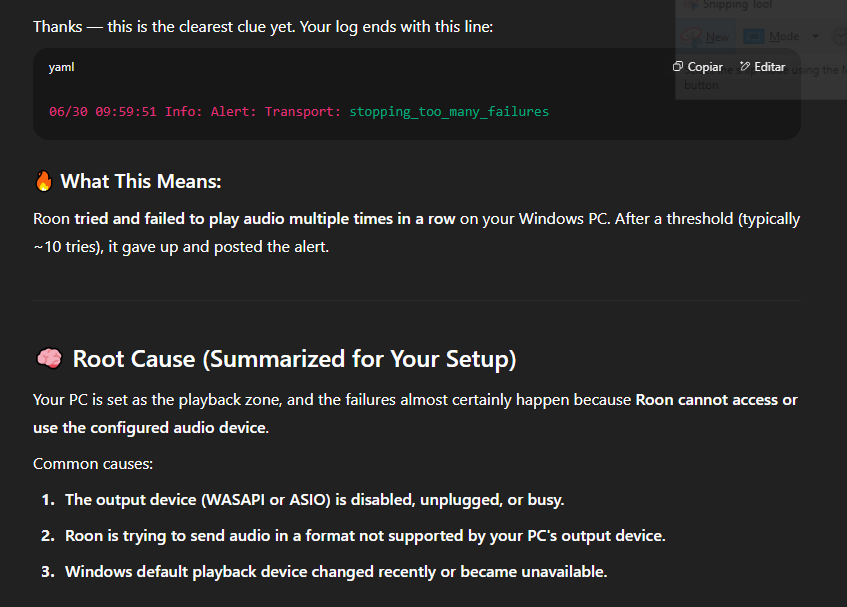
06/30 09:59:51 Info: Alert: Transport: stopping_too_many_failures
06/30 09:59:51 Warn: AddTopLevel: win_alert(3421)
ChatGPT says this about the logs:


I can access Ropieee via its IP address no problem!
I have restarted the ROCK server and the issue persists.
I am using RopieeeXT and ChatGPT suggested i use the normal Ropieee, maybe that is my best option?
EDIT: I actually have another Raspberry Pi (this one without any audio hats) in my bedroom, so i took off its sd card which also runs the exact same PieeeXT and inserted it in the Pi2AES - that will allow me to both test a different installation as well as a different sd card, i think this is as good test as it gets!
The fact that it’s checking for updates and getting back appropriate no update required messages, means that it’s communicating out to Roon and your being able to access the local Ropee page means that you don’t have network issues. That’s a nice step one.
Now you’re looking at software.
The other big reason Roon has the issues you originally decribed is it not being able to see an audio device (DAC). So as chat GTP suggest, set your local machine to use Wasapi for all default audio.
If you’re using your PC as the Roon server that complicated things and makes your local settings even more critical. I can’t believe reading your whole post again that no one asked you which version of Roon you were using. lol So much for letting people on the internet help. lol should have been the first quetion I asked. Derp.
If you use the PC as both your server and remote, the machine is running two separte Roon instances and to put it as short as possible.
You’d want Wasapi for local playback using direct playback complicates things alot.
1 Like
Quick question though.
I was using the Pi2AES via COAX when i had a Gumby, but now that i have a WANDLA i am plugging it via USB directly into the Pi2AES’s usb port, so i am no longer really using the audio hat at all, am i?
As in, if i just replace the Pi2AES with my bedroom’s Rasbperry Pi i would get the exact same audio quality?
And if that is the case, is your statement about the Pi2AES being the best sounding device under $700 still true?
I am now using USB because Ferrum specifically told me that is the best way to use the WANDLA, i am so confused about all of this, lol